HOW TO view historical data of Sensex & Nifty indices with Google Docs Spreadsheet
The GoogleFinance function can be used to fetch historical data for a specified time period.
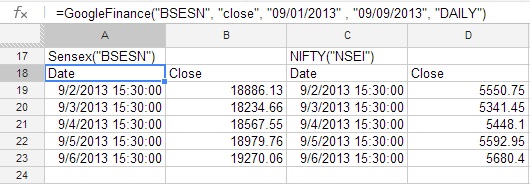
Try these to get historical data of Sensex & Nifty indices for the first 9 days of September 2013:
=GoogleFinance("BSESN", "close", "09/01/2013" , "09/09/2013", "DAILY")
=GoogleFinance("NSEI", "close", "09/01/2013" , "09/09/2013", "DAILY")
You can even go back in time. The Sensex was at 4031.55 this day in 1997!
Comments
Post a Comment